
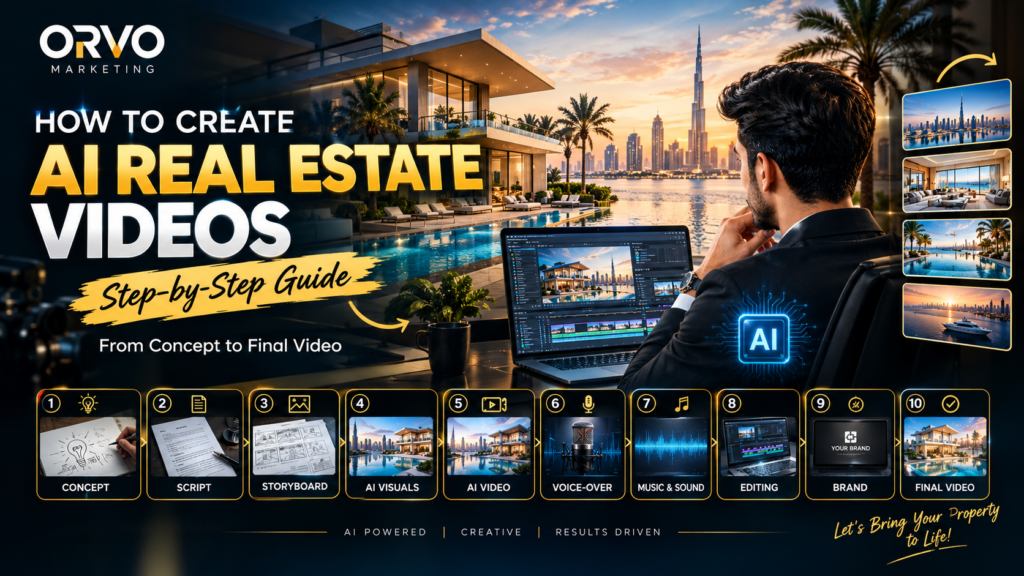
Creating a professional AI property video involves several stages.
The basic workflow is:
Idea → Script → Storyboard → AI Visuals → AI Video → Voice-over → Editing → Quality Control → Final Video
Let’s look at each step.
Step 1: Start With the Real Estate Concept
Every good video starts with a clear concept.
Before generating any visuals, determine what the video needs to communicate.
For example, a luxury Dubai property video could focus on:
- Luxury lifestyle
- Property architecture
- Waterfront living
- Premium interiors
- Investment positioning
- Location
- Amenities
- Brand identity
The concept determines the visual direction of the entire video.
Example
Instead of simply saying:
“Create a video of a luxury house.”
A more useful concept would be:
“Create a cinematic luxury real estate advertisement showing a modern waterfront villa, premium interiors, sunset atmosphere and an aspirational lifestyle.”
A detailed concept gives the AI production process a clear direction.
Step 2: Write the Script
Once the concept is ready, create the script.
The script determines what the audience sees and hears throughout the video.
A real estate video script can include:
Hook → Property Introduction → Features → Lifestyle → Location → CTA
For example:
“Imagine waking up to breathtaking waterfront views.
A home designed around luxury, privacy and modern living.
Welcome to a new standard of real estate.”
The script can then be divided into individual scenes.
Step 3: Create the Storyboard
The next step is turning the script into a visual plan.
Each sentence or idea can become one or more video scenes.
Example:
Scene 1: Exterior establishing shot
Scene 2: Cinematic approach toward the property
Scene 3: Luxury living room
Scene 4: Bedroom with panoramic views
Scene 5: Swimming pool and outdoor area
Scene 6: Sunset lifestyle shot
Scene 7: Final property/brand CTA
This is called a storyboard.
A storyboard helps maintain continuity between scenes and makes the AI video production process more organized.
Step 4: Create AI Real Estate Visuals
Now the visual production begins.
AI image-generation tools can be used to create detailed property scenes based on carefully written prompts.
A good AI real estate prompt can specify:
- Property architecture
- Interior design
- Location
- Time of day
- Lighting
- Camera angle
- Lens style
- Materials
- Landscaping
- Atmosphere
- Cinematic composition
Example AI prompt:
“Ultra-realistic luxury waterfront villa in Dubai, contemporary architecture, floor-to-ceiling glass windows, infinity pool, elegant landscaping, warm sunset lighting, cinematic architectural photography, realistic materials, premium real estate advertisement, wide-angle composition.”
The more controlled the prompt, the more predictable the visual direction can become.
Step 5: Turn AI Images Into Video
Once the visuals are created, they can be animated using AI video-generation tools.
This is where a static property image becomes a moving cinematic scene.
For example, you can create movements such as:
- Slow camera push-in
- Cinematic camera pull-back
- Sideways camera movement
- Aerial-style movement
- Slow architectural reveal
- Natural environmental motion
- Subtle lighting changes
Example motion prompt:
“Slow cinematic camera push toward the luxury villa, realistic environmental movement, subtle palm tree motion, natural reflections in the swimming pool, smooth professional camera movement, realistic depth of field.”
The objective is to make the movement feel intentional rather than simply adding random animation.
Step 6: Add Voice-Over
A professional voice-over can turn individual scenes into a complete story.
The voice should match the property’s positioning.
For a luxury real estate campaign, the voice could be:
- Premium
- Confident
- Natural
- Professional
- Calm
- Aspirational
The voice-over should also match the pacing of the visuals.
Step 7: Add Music and Sound Design
Music helps establish the mood of the video.
For luxury real estate, cinematic background music can be combined with subtle sound effects.
For example:
- Ambient atmosphere
- Soft transitions
- Cinematic impacts
- Whoosh effects
- Environmental sounds
- Background music
Good sound design makes AI-generated visuals feel more like a finished commercial.
Step 8: Edit the Complete Video
Now all the individual elements are combined.
The editing stage includes:
- AI video clips
- Voice-over
- Music
- Sound effects
- Transitions
- Text
- Logo
- Color grading
- Timing
The editor also removes unnecessary shots and makes sure the story flows naturally.
This is an important stage because AI-generated clips alone do not automatically create a professional marketing video.
Creative direction and editing determine how those clips work together.
Step 9: Add Real Estate Branding
The final video should match the real estate company’s brand.
Depending on the campaign, branding can include:
- Company logo
- Project name
- Property name
- Brand colors
- Contact information
- Website
- Social media handle
- Call to action
Branding should be integrated naturally without distracting from the property.
Step 10: Quality Control
Before publishing the video, every scene should be reviewed.
Important checks include:
Visual Quality
- Is the property realistic?
- Are architectural details consistent?
- Are there unwanted distortions?
AI Quality
- Are faces natural?
- Are hands and objects correct?
- Is there flickering?
- Are objects changing between frames?
Audio
- Is the voice-over clear?
- Is the music too loud?
- Are transitions smooth?
Branding
- Is the logo correct?
- Is the CTA correct?
- Is there any unwanted text or watermark?
This final review helps turn AI-generated material into polished marketing content.
Step-by-Step AI Real Estate Video Workflow
The complete process can be summarized as:
1. Concept
↓
2. Script
↓
3. Storyboard
↓
4. AI Visual Creation
↓
5. AI Video Generation
↓
6. Voice-Over
↓
7. Music & Sound Design
↓
8. Professional Editing
↓
9. Branding
↓
10. Quality Control
↓
11. Final Video
Where Can AI Real Estate Videos Be Used?
AI property videos can be adapted for different marketing channels.
Social Media
- Instagram Reels
- YouTube Shorts
- TikTok
Advertising
- Meta Ads
- YouTube Ads
- Property campaigns
- Lead-generation campaigns
Websites
AI property videos can also be used on:
- Property listing pages
- Developer websites
- Landing pages
- Real estate agency websites
Presentations
Real estate companies can also use cinematic AI videos in:
- Client presentations
- Investor presentations
- Project launches
- Property exhibitions
AI Video for Luxury Real Estate
Luxury properties require strong visual storytelling.
A property video can showcase more than the building itself.
It can communicate:
Architecture + Lifestyle + Location + Experience
For example, instead of only showing a villa, an AI-generated campaign can visually connect the property with:
- Waterfront lifestyle
- Luxury interiors
- Modern architecture
- Sunset environments
- Premium vehicles
- City skylines
- Outdoor experiences
This approach can help transform property information into a visual story.
AI Real Estate Video vs Traditional Video Production
AI video production and traditional filming can use different workflows.
Traditional production may require:
- Location planning
- Camera crew
- Equipment
- Actors or models
- Travel
- Multiple shooting days
- Post-production
AI production can create or generate many visual elements digitally.
However, professional AI video production still requires:
- Creative direction
- Scriptwriting
- Visual planning
- Prompt development
- Editing
- Quality control
- Brand understanding
AI is a production technology—not a replacement for creative direction.
How Orvo Marketing Creates AI Real Estate Videos
At Orvo Marketing, the AI video production process focuses on turning a business idea into a complete visual campaign.
Our workflow can be structured around:
Client Brief → Concept → Script → Storyboard → AI Visuals → AI Video Generation → Voice & Sound → Editing → Quality Control → Final Delivery
The process can be adapted for:
- Real estate developers
- Property brokers
- Real estate agents
- Luxury property brands
- Property marketing campaigns
- Businesses and brands
The focus is on creating content that is not only visually impressive but also designed for marketing communication.
Watch the AI Real Estate Video Creation Process
Want to see how the final result looks?
Watch the video above to see an example of an AI-generated luxury real estate video.
You can also attach your step-by-step tutorial PDF below the video so readers can understand the complete production workflow.
Suggested blog section:
Want to Learn How We Created This AI Real Estate Video?
Download our step-by-step AI Real Estate Video Production Tutorial to understand the process from concept and AI visuals to video generation, voice-over, editing and final delivery.
[Download the AI Real Estate Video Production Tutorial]
Frequently Asked Questions
How are AI real estate videos made?
AI real estate videos are created by combining concept development, scripting, AI-generated visuals, AI video generation, voice-over, sound design, editing and quality control.
Can AI create luxury property videos?
Yes. AI can be used to create cinematic property environments, architectural visuals, interiors, exteriors and lifestyle scenes. The final result depends heavily on creative direction, prompts and editing.
Can AI videos be used for real estate marketing?
Yes. AI-generated videos can be adapted for social media, digital advertising, websites, presentations and property marketing campaigns.
How long does it take to create an AI real estate video?
Production time depends on the video’s duration, number of scenes, visual complexity, revisions, voice-over and editing requirements.
Can AI create videos from property images?
Yes. Property images can be used as references for creating or animating visual content, depending on the AI tools and workflow being used.
What does an AI video production company do?
An AI video production company manages the creative and production workflow, including concept development, scripting, visual generation, AI video creation, editing, sound design and final delivery.
Conclusion
AI is changing the way real estate brands can approach video production.
From a simple concept, businesses can build a complete visual story using AI-generated visuals, cinematic motion, voice-over, sound design and professional editing.
The key is not simply generating an AI image or video clip. A successful real estate video requires a structured production process:
Concept → Script → Visuals → Video → Sound → Editing → Quality Control → Final Campaign
At Orvo Marketing, we use this AI-powered production approach to create cinematic video content for real estate, brands and businesses.
Have a property, product or campaign you want to turn into an AI video?
Contact Orvo Marketing and turn your idea into a cinematic AI video.
